AI coding assistants are good at writing npm install lines. They're less good at knowing whether the package in that line is real, abandoned, or a trap.
I wanted my assistant to check before it suggests anything. So I built a small MCP server for it: two tools, running on Cloudflare Workers, using the new stateless MCP spec from July 2026. It's free to host and needs no API keys.
This post walks through the build. It also covers the parts that surprised me, and a few of them changed how the tools work.
What we're building
The server is called pkgscout. It exposes two tools:
inspect_packagetells the model whether a package exists, its latest version, weekly downloads, license, repository, and whether it's deprecated. If the name doesn't exist, it looks for the real package the model probably meant.check_vulnerabilitieschecks exact versions against npm's advisory database, the same onenpm audituses.
Both tools only read public data from the npm registry. That keeps the server simple, and it means the free Workers plan is enough.
The stack:
- MCP TypeScript SDK v2 (
@modelcontextprotocol/server, 2.4.0 at the time of writing) - Hono for routing and auth
- zod for input validation
- Cloudflare Workers for hosting
The full code is on GitHub: https://github.com/tarunsinghofficial/pkgscout
Why the July 2026 spec matters here
Until this year, a remote MCP server kept a session open with each client. The client sent an initialize request, the server returned an Mcp-Session-Id, and every request after that had to reach a server that remembered the session. On a platform like Workers, where any request can land on any instance, that was awkward.
The 2026-07-28 spec removes that handshake. Each request carries what the server needs, so any instance can answer it. For a Worker, that's the natural model. You build a fresh server for each request, answer it, and throw it away.
SDK v2 is built around this. It also splits the old single @modelcontextprotocol/sdk package into separate client and server packages, so older tutorials won't match what you see when you install it.
Setup
mkdir pkgscout && cd pkgscout
npm init -y
npm pkg set type=module
npm install @modelcontextprotocol/server hono zod
npm install -D wrangler typescript @cloudflare/workers-types @modelcontextprotocol/client tsx
The Wrangler config is short. Turning on observability gives you logs in the Cloudflare dashboard without any extra setup.
// wrangler.jsonc
{
  "name": "pkgscout",
  "main": "src/index.ts",
  "compatibility_date": "2026-10-01",
  "compatibility_flags": ["nodejs_compat"],
  "observability": { "enabled": true }
}
One thing I expected to fight with and didn't: JSON Schema validation on Workers. Validators that compile schemas with eval don't run there. SDK v2 checks the runtime and uses a Workers-safe validator automatically, so there was nothing to configure.
Talking to the npm registry
All the data comes from registry.npmjs.org. I put the registry calls in their own file, src/registry.ts, and the MCP code just calls those functions.
My first version fetched the full package document (the "packument") to get everything in one request. That works for small packages. For a big one, it's a different story. When I checked, the typescript packument was about 16 MB, because it lists every version ever published. Its /latest manifest was under 5 KB.
That matters on Workers. The free plan gives each request 10 ms of CPU time. Parsing megabytes of JSON for one lookup is a good way to blow through that.
So the server asks for /<name>/latest instead. Every registry call goes through one small helper:
const REGISTRY = "https://registry.npmjs.org";

// Scoped names like @hono/node-server need the slash encoded in the URL path.
const encodeName = (name: string) => name.replace("/", "%2f");

// Cloudflare caches subrequests for us when we pass cacheTtl.
// Five minutes is plenty: package metadata doesn't change by the second.
async function getJson(url: string, init: RequestInit = {}) {
  return fetch(url, {
    ...init,
    headers: { accept: "application/json", ...(init.headers ?? {}) },
    cf: init.method === "POST" ? undefined : { cacheTtl: 300, cacheEverything: true },
  } as RequestInit);
}
The cf.cacheTtl option is a nice Workers detail. Cloudflare caches the registry response at the edge, so when the model asks about zod three times in one conversation, the repeat calls can be answered from cache instead of going back to npm.
Search is fuzzy, and it hides deprecated packages
The manifest doesn't include download counts. The registry's search endpoint does, so I called /-/v1/search?text=<name> and picked the hit with the matching name.
That worked for hono. It didn't work for request, the old HTTP client. I asked search for request and got retry-request, teeny-request, @types/request and 22 others. The request package itself wasn't in the top 25 results.
I tried two more deprecated packages, querystring and left-pad. Neither showed up in its own top 25 either. Search clearly ranks deprecated packages low. That's sensible for humans browsing npm. It's bad for a tool whose job is to tell the model "this package is deprecated."
The fix was to get downloads from npm's downloads API and keep search as a fallback:
async function weeklyDownloads(name: string): Promise<number | null> {
  const res = await getJson(`https://api.npmjs.org/downloads/point/last-week/${name}`);
  if (!res.ok) return null;
  const body = (await res.json()) as { downloads?: number };
  return typeof body.downloads === "number" ? body.downloads : null;
}
With that change, request came back with its deprecation notice and about 14 million downloads last week. Deprecated since 2020, and still one of the most downloaded packages on npm. That's exactly the kind of package a model will keep suggesting.
The typo problem
This is the part that made the project worth writing about.
When a package doesn't exist, the most useful thing the tool can do is point at the package the model probably meant. My first attempt passed the misspelled name to npm search and returned the top five results.
I tested it with reqeusts, a plausible typo for requests. Search returned simple-server-request, clientside-api-request, nifty-guard, @yof/cli and @tutorbot/api-client. None of them had more than 200 weekly downloads, and none had anything to do with HTTP requests.
That's worse than returning nothing. A model reading "similar packages" will happily suggest one of them.
So I stopped asking search and generated the typos myself. Most misspellings are two letters swapped or one letter dropped, so the server builds those variants and checks which ones exist:
function typoCandidates(name: string) {
  const out = new Set<string>();
  // two neighbouring letters swapped
  for (let i = 0; i < name.length - 1; i++) {
    out.add(name.slice(0, i) + name[i + 1] + name[i] + name.slice(i + 2));
  }
  // one letter dropped
  for (let i = 0; i < name.length; i++) {
    out.add(name.slice(0, i) + name.slice(i + 1));
  }
  out.delete(name);
  // Workers cap how many fetches one request can make (50 on the free plan),
  // so keep the fan-out bounded.
  return [...out].filter((n) => n.length > 1).slice(0, 20);
}
The cap matters. The Workers free plan allows 50 outbound fetches per request. Without a limit, a long package name would generate enough variants to hit it.
With this change, reqeusts returned three real packages: requests, reqests and reqeust. I looked them up one by one, and none of them is what you want.
requestson npm is a browser XHR library from 2014. It has nothing to do with Python'srequests. A model that mixes up ecosystems and writesnpm install requestsgets this.reqestshas one version,0.0.1-security, with the description "security holding package." That's what npm leaves behind after it takes down a malicious package. It got one download last week.reqeusthas a single version from 2015. Its description is copied word for word fromrequest("Simplified HTTP request client."), and it's published by an account unrelated to the real project. It still gets over 400 downloads a week.
Three typo neighbours, three different traps. Returning bare names wasn't enough, so each suggestion now comes with the same warnings as a normal lookup:
// Plain-language flags the model can act on without guessing what the raw numbers mean.
function warningsFor(m: Manifest, weekly: number | null): string[] {
  const w: string[] = [];
  if (m.version.endsWith("-security")) {
    w.push("npm replaced this package with a security placeholder. The original was likely malicious. Do not install.");
  }
  if (m.deprecated) w.push(`Deprecated: ${m.deprecated}`);
  if (weekly !== null && weekly < 1000) w.push(`Only ${weekly} download${weekly === 1 ? "" : "s"} last week.`);
  if (!m.repository) w.push("No source repository listed.");
  return w;
}
I could have returned raw fields and let the model work it out. But "version": "0.0.1-security" only means something if you already know npm's conventions. "Do not install" leaves nothing to interpret.
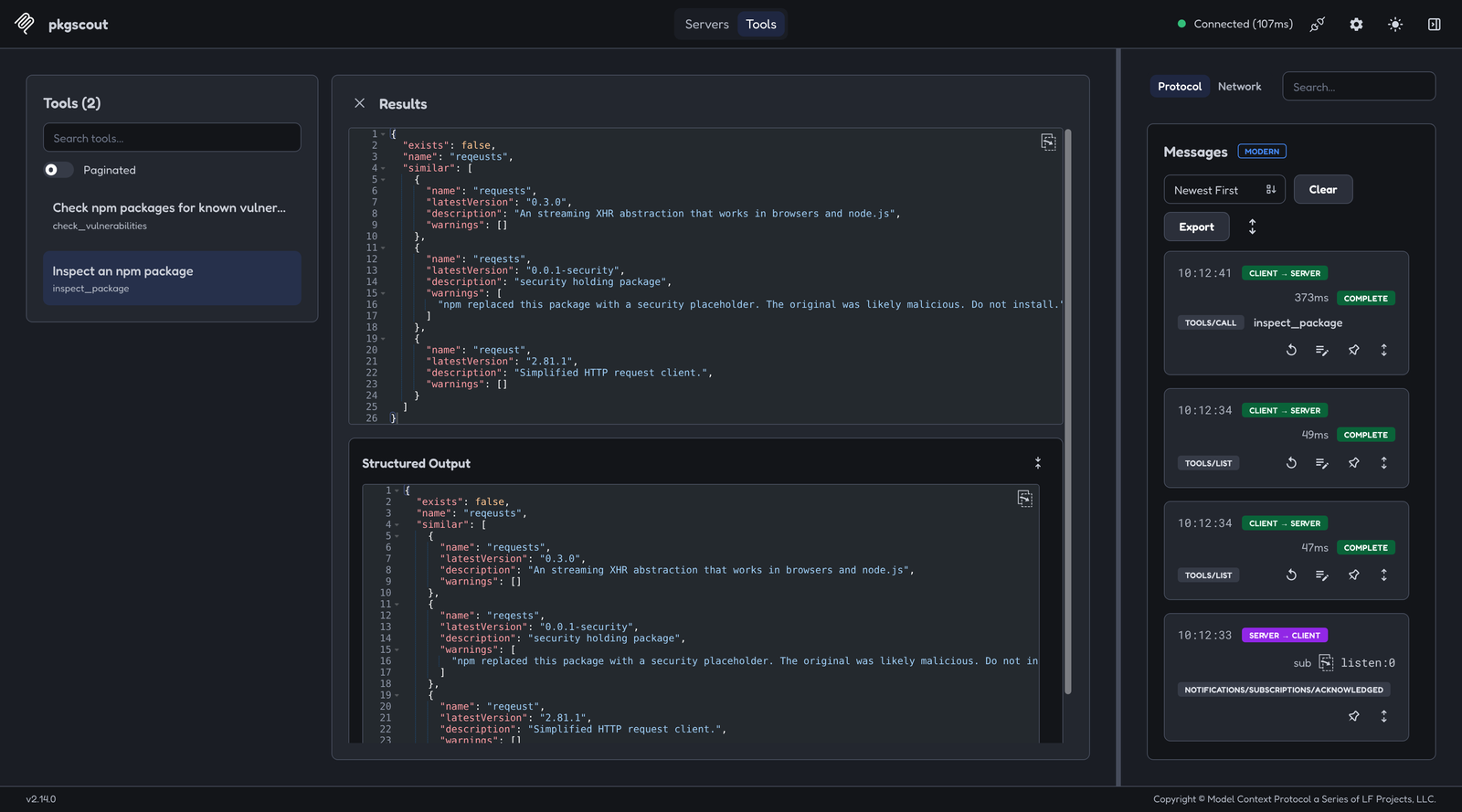
Here's what inspect_package returns for reqeusts now (trimmed):
{
  "exists": false,
  "name": "reqeusts",
  "similar": [
    {
      "name": "requests",
      "latestVersion": "0.3.0",
      "description": "An streaming XHR abstraction that works in browsers and node.js",
      "warnings": []
    },
    {
      "name": "reqests",
      "latestVersion": "0.0.1-security",
      "description": "security holding package",
      "warnings": [
        "npm replaced this package with a security placeholder. The original was likely malicious. Do not install.",
        "Only 1 download last week."
      ]
    },
    {
      "name": "reqeust",
      "latestVersion": "2.81.1",
      "description": "Simplified HTTP request client.",
      "warnings": ["Only 433 downloads last week."]
    }
  ]
}
Checking for known vulnerabilities
The second tool uses the endpoint npm audit talks to. You POST a map of package names to versions, and it returns matching advisories:
const res = await getJson(`${REGISTRY}/-/npm/v1/security/advisories/bulk`, {
  method: "POST",
  headers: { "content-type": "application/json" },
  body: JSON.stringify({ lodash: ["4.17.15"], express: ["4.17.1"] }),
});
The catch is that it wants exact versions. If you send ^4.17.0, you won't get a useful answer. Models love sending ranges, because that's what they see in package.json files. So the input schema rejects anything that doesn't start with a real version number:
inputSchema: z.object({
  packages: z
    .array(z.object({
      name: z.string().min(1),
      version: z.string().regex(/^\d+\.\d+\.\d+/, "Use an exact version"),
    }))
    .min(1)
    .max(50),
}),
When validation fails, the SDK sends the message back to the model as a tool error instead of crashing the request. The model sees packages.0.version: Use an exact version and can fix its own call.
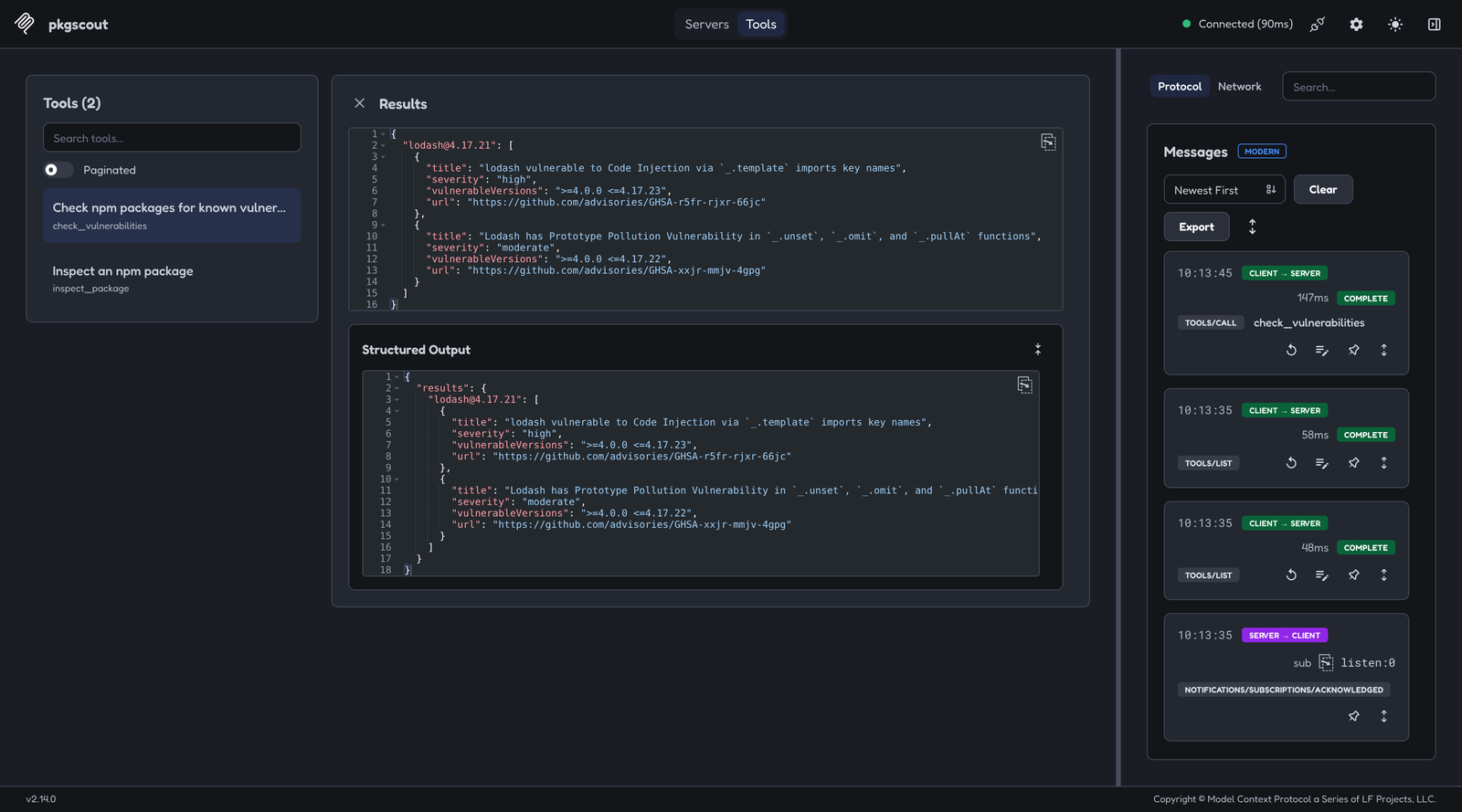
Testing lodash@4.17.15 returned five advisories, three of them rated high. Then I tried 4.17.21, the version a lot of us remember as "the fixed one." It still matches two advisories: a high-severity code injection in _.template and a prototype pollution bug in _.unset. The current release is 4.18.1.
That's a good example of why this tool is useful. A model trained on older code will confidently suggest 4.17.21 as the safe version.
Wiring up the MCP server
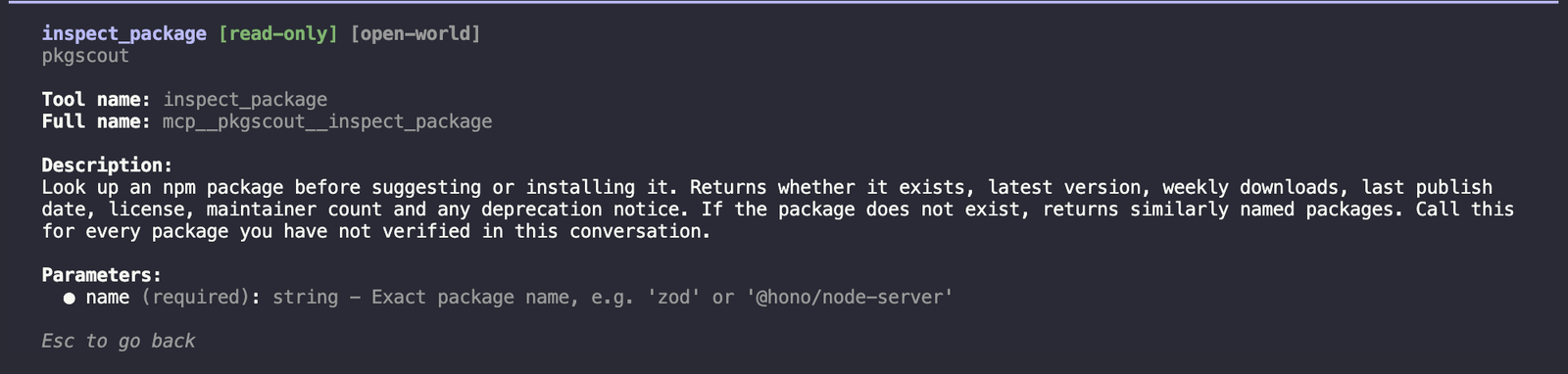
With the registry code done, the MCP part is short. Each tool gets a name, a description written for the model, a schema, and a handler:
import { Hono } from "hono";
import { createMcpHandler, McpServer } from "@modelcontextprotocol/server";
import { z } from "zod";
import { checkVulnerabilities, inspectPackage } from "./registry";

function buildServer() {
  const server = new McpServer({ name: "pkgscout", version: "1.0.0" });

  server.registerTool(
    "inspect_package",
    {
      title: "Inspect an npm package",
      description:
        "Look up an npm package before suggesting or installing it. Returns whether it exists, " +
        "latest version, weekly downloads, last publish date, license, maintainer count and any " +
        "deprecation notice. If the package does not exist, returns similarly named packages. " +
        "Call this for every package you have not verified in this conversation.",
      inputSchema: z.object({
        name: z.string().min(1).max(214).describe("Exact package name, e.g. 'zod' or '@hono/node-server'"),
      }),
      annotations: { readOnlyHint: true, openWorldHint: true },
    },
    async ({ name }) => {
      try {
        const report = await inspectPackage(name.trim().toLowerCase());
        return {
          content: [{ type: "text", text: JSON.stringify(report, null, 2) }],
          structuredContent: report,
        };
      } catch (err) {
        return {
          content: [{ type: "text", text: `Could not look up ${name}: ${String(err)}` }],
          isError: true,
        };
      }
    },
  );

  // check_vulnerabilities is registered the same way.
  // (Logging trimmed here. The repo version logs one JSON line per call.)

  return server;
}
A few details are worth calling out:
- The description tells the model when to call the tool, not just what it does. "Call this for every package you have not verified" is aimed at the model, not at a human reading docs.
readOnlyHint: truetells the client the tool only reads data and changes nothing.- Errors come back as results with
isError: true. If npm is down, the model gets a sentence it can read instead of a broken request.
Now the stateless part:
// One handler per isolate. It calls buildServer() for every request.
const mcp = createMcpHandler(buildServer);

const app = new Hono<{ Bindings: { MCP_TOKEN: string } }>();

app.use("/mcp", async (c, next) => {
  const header = c.req.header("authorization") ?? "";
  const token = header.startsWith("Bearer ") ? header.slice(7) : "";
  if (!c.env.MCP_TOKEN || !(await safeEqual(token, c.env.MCP_TOKEN))) {
    return c.json({ error: "unauthorized" }, 401);
  }
  await next();
});

app.all("/mcp", (c) => mcp.fetch(c.req.raw));

export default app;
createMcpHandler takes a factory function, not a server. It calls buildServer() for each request, which is the whole idea of the new spec. Nothing is kept between requests, so it doesn't matter which Cloudflare instance answers.
It also handles older clients. By default, requests that use the 2025 protocol are served statelessly too, so a client that hasn't updated yet still works.
For auth I used a single bearer token stored as a Worker secret. safeEqual (in the repo, about ten lines) hashes both values and compares the hashes, so the check takes the same time whether the token is close or completely wrong. A shared token is fine for a personal server. If you plan to share yours, the new spec's OAuth rules are the next step.
Running it locally
echo 'MCP_TOKEN=local-dev-token' > .dev.vars
npx wrangler dev
To test without wiring up a whole AI client, I wrote a short script with the v2 client package:
import { Client, StreamableHTTPClientTransport } from "@modelcontextprotocol/client";

const client = new Client(
  { name: "pkgscout-test", version: "1.0.0" },
  { versionNegotiation: { mode: "auto" } },
);

await client.connect(
  new StreamableHTTPClientTransport(new URL("http://localhost:8787/mcp"), {
    requestInit: { headers: { authorization: "Bearer local-dev-token" } },
  }),
);

const res = await client.callTool({ name: "inspect_package", arguments: { name: "reqeusts" } });
console.log(res.content);
That versionNegotiation line cost me some time. Without it, the v2 client still speaks the 2025 protocol. Everything worked, so nothing looked wrong. I only noticed because I logged which protocol each request used and every one said legacy. Setting mode: "auto" makes the client try the 2026 protocol first.
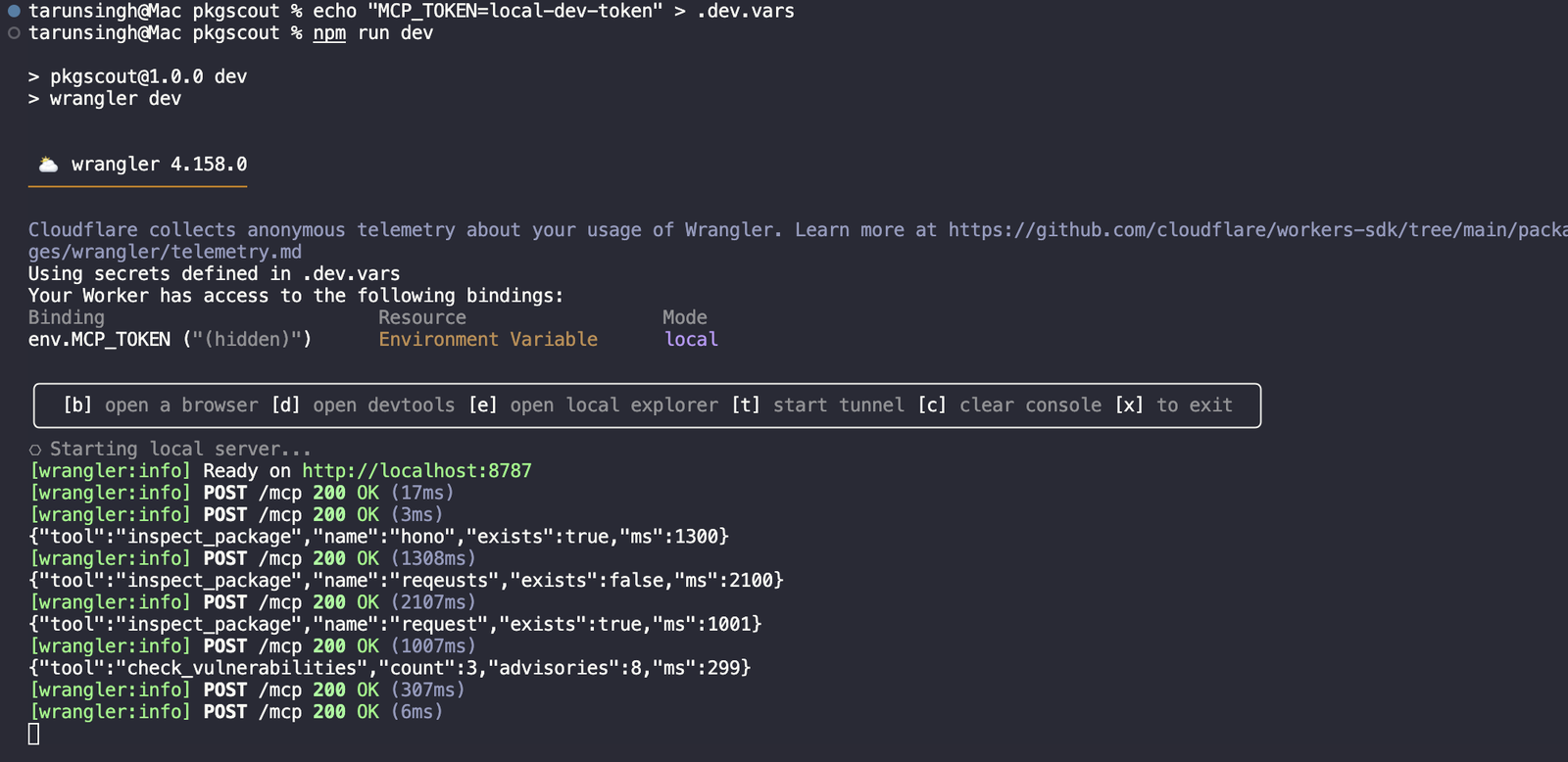
You can see the difference in the wrangler dev output. With the old protocol, the client opens with a handshake and a GET /mcp that the server rejects with a 405. With the new one, it's just a series of POST /mcp requests, each one complete on its own.
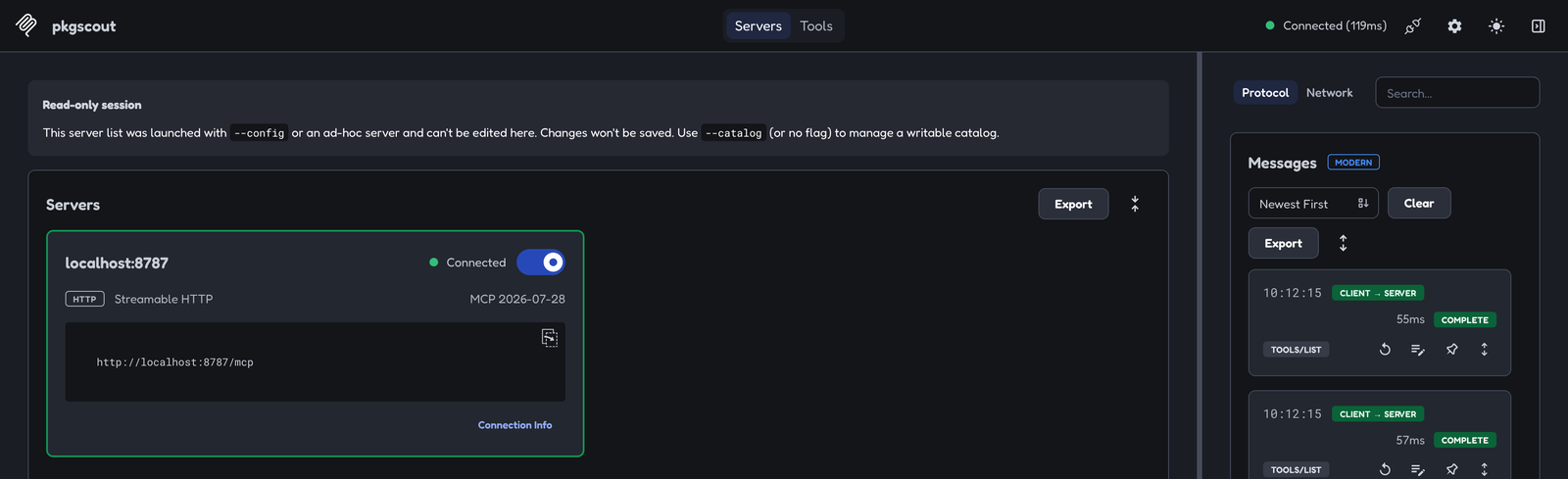
If you'd rather click than script, MCP Inspector v2 can talk the new protocol too. Start it with --protocol-era modern and it shows the negotiated version right on the connection card:
npx @modelcontextprotocol/inspector --web --transport http \
  --server-url http://localhost:8787/mcp \
  --header "Authorization: Bearer local-dev-token" \
  --protocol-era modern
Deploying
npx wrangler login
printf %s "$MCP_TOKEN" | npx wrangler secret put MCP_TOKEN
npx wrangler deploy
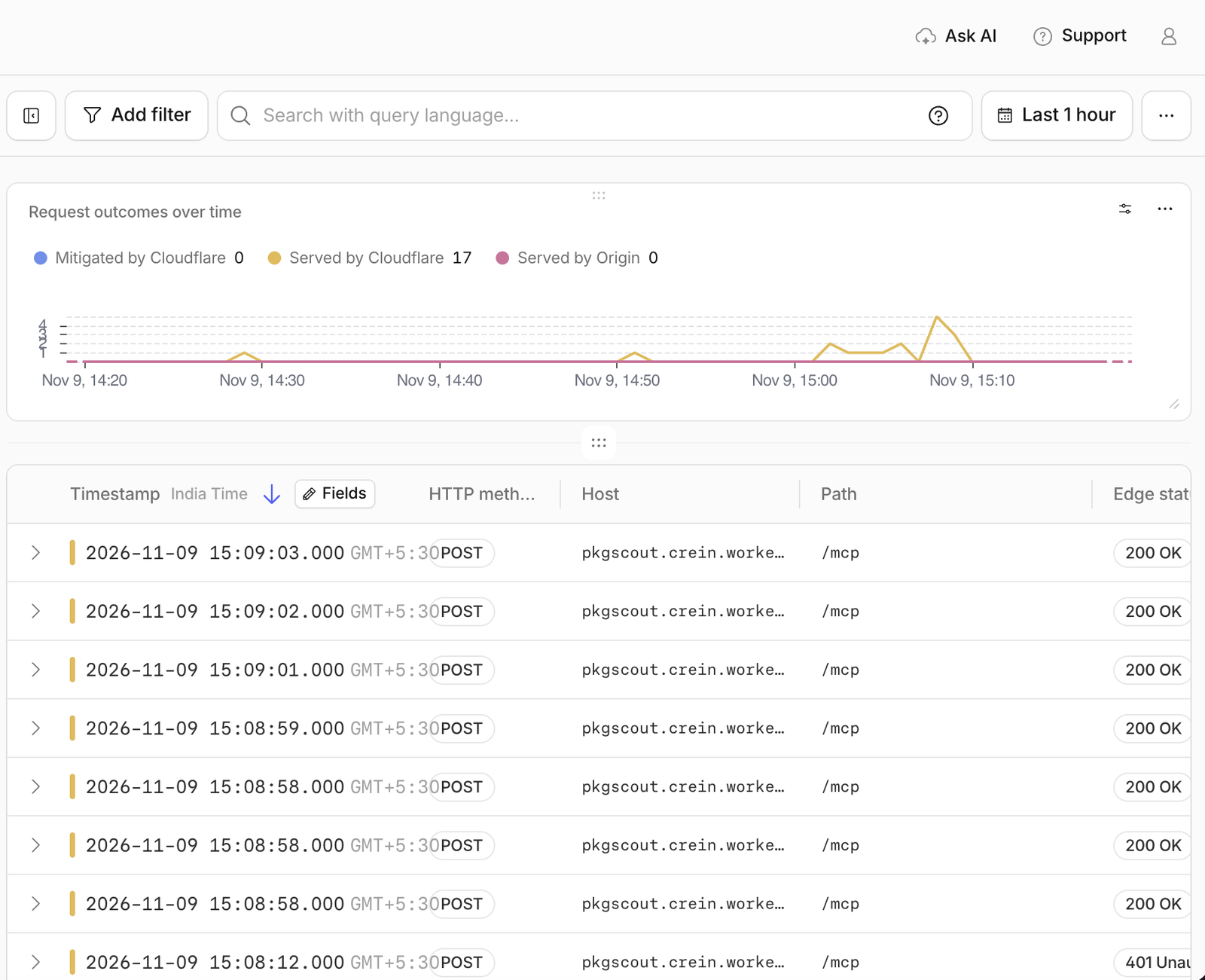
That printf %s is there for a reason. The first time, I pasted the token into the secrets screen in the dashboard and every request came back 401. The value the Worker stored didn't match the one in my terminal, most likely because of a stray character from the paste. Piping it from the same shell variable your client uses rules that out. A quick check before you wire up a client:
curl -s -o /dev/null -w "%{http_code}\n" -X POST https://pkgscout.<your-subdomain>.workers.dev/mcp \
  -H "Authorization: Bearer $MCP_TOKEN"
A 401 means the token is wrong. A 415 means auth passed and the server just wants a real MCP request.
Wrangler prints your URL, something like https://pkgscout.<your-subdomain>.workers.dev. Each tool call writes one JSON log line with the tool name, the outcome and how long it took, and you can read them under Observability in the Cloudflare dashboard.
Connecting it to Claude Code and Cursor
Claude Code:
claude mcp add --transport http pkgscout https://pkgscout.<your-subdomain>.workers.dev/mcp \
  --header "Authorization: Bearer <your token>"
Cursor (~/.cursor/mcp.json):
{
  "mcpServers": {
    "pkgscout": {
      "url": "https://pkgscout.<your-subdomain>.workers.dev/mcp",
      "headers": { "Authorization": "Bearer <your token>" }
    }
  }
}
Then ask for something that needs a package. A good test is adding lodash@4.17.21 to a small Node script, since that's the version a lot of older code pins. This is the check the assistant should run first, done by hand in MCP Inspector:
What I'd add next
- PyPI support. The same typo problem exists there, and Python's
requestsis a much bigger target than npm's. - OAuth under the new spec, if you want to share the server with a team instead of handing out one token.
- A check for brand-new packages. A package created last week with a name one letter off a popular one is a strong signal. That needs the publish history, which means fetching more than the
/latestmanifest, so it has to be done carefully on a 10 ms CPU budget.
Wrapping up
The MCP part of this project was the easy part. Most of the work went into the data: noticing that search hides deprecated packages, that typo suggestions can point at malicious ones, and that the "safe" lodash version isn't safe anymore. That's where a tool like this earns its place in your editor.
The code is on GitHub: https://github.com/tarunsinghofficial/pkgscout. If you try it with a misspelling that slips past it, I'd like to hear about it.